
Reports Overview
Overview
In chemical management, accurate and up to date reporting is crucial to ensure the safety of all stakeholders and to minimize hazards for the environment. ChemCenter’s reporting features help organizations in this regard. Reports may be created and customized at any time.
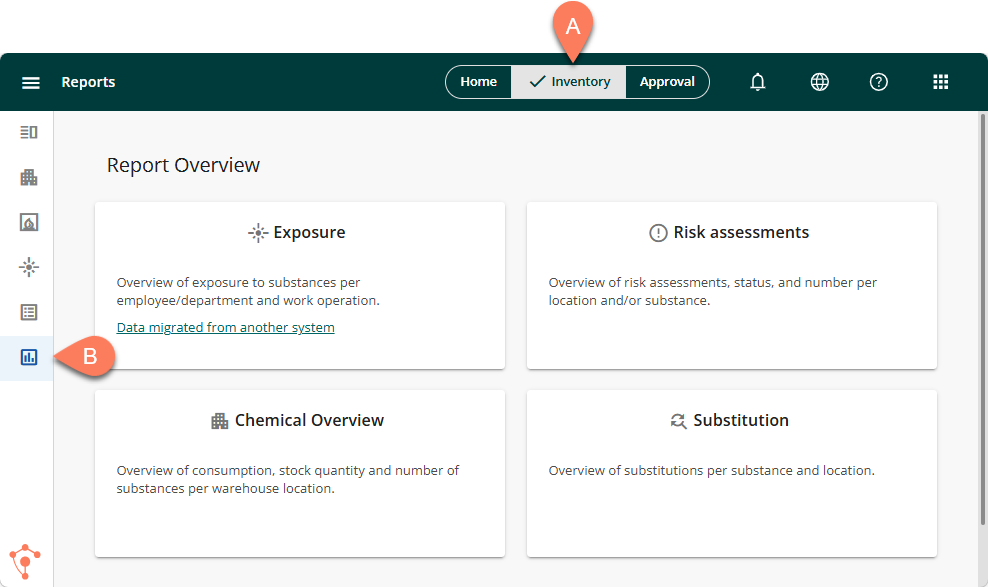
This article covers the different types of reports available in ChemCenter. You can find these when you navigate to the A Inventory tab from the global header, then select B Reports from the side navigation pane.
Other reports may also be custom generated from other areas in ChemCenter.
Types of reports
The major types of reports in ChemCenter are Risk assessments, Chemical Overview, and Substitution.
Risk assessments
The Risk assessment report displays the Inherent hazard and Risk in ChemCenter by substance and location. The substances and locations that appear in the report depend on the filters you apply. You can select which columns appear on the report.
Chemical Overview
The Chemical Overview report is a high-level view of your Substance Index which serves as your inventory system in ChemCenter. It has advanced search capabilities to get full details of the assessed hazard and risk, quantity, and usage data of existing chemicals in your inventory. This capability allows you to generate regulatory compliance reports including REACH, CMR, UN transport codes, and CLP labelling.
Substitution
The Substitution report is a dashboard of all products and activities related to substitution. This dashboard displays data by time range.